Contents
- From Footnotes in Microsoft Word to Endnotes in WordPress
- General Style Guidelines (alphabetically ordered)
- Image Guidelines
- General Guidelines for WordPress for Content Editors and Review Editors
EHN welcomes public-facing essays, between 750–1250 words, on a wide range of environment-related topics in any language. Exceptions to the length can be made in consultation with the editorial board. The essay can cover a topic related to research and/or personal experience, and can address any topic, time period, or geographic location. Contributors might also consider submitting to one of our ongoing series.
Important
- Submit the essay in a Word document. Contributors will receive editorial feedback with comments and the “Track Changes” feature. Submitting as a Google Doc is possible.
- Authors are welcome to submit an essay in languages other than English. EHN will publish the original and translated English version.
- If you have questions about the guidelines, ask the editor-in-chief.
The working language of EHN is American English. Our house style is The Chicago Manual of Style, unless guidelines differ below.
Responsibilities
- Authors are responsible for staying within the word limit (750–1250 words). Every article has a cover image: authors may provide images to accompany their essay, in which case they are responsible for obtaining the copyright, unless the images are owned by the author. Alternatively, the EHN team may choose images. Authors must correctly format footnotes in the Word document using The Chicago Manual of Style. The editorial stage using the Word document requires the use of footnotes, which will convert automatically to endnotes when drafted on WordPress. Please see sections below for guidelines on images and notes.
- Content editors are responsible for editing the content of the essay and for working closely with the author. They make sure that the word count is respected and the formatting is appropriate. If the author does not select an image, the content editor may choose one for the essay. The editor drafts the essay on WordPress.
- Review editors are responsible for reviewing the essay thoroughly and for making sure that all guidelines have been followed.
- Editor-in-Chief performs final review and schedules the publication.
1. From Footnotes in Word to Endnotes in WordPress
Notes
Footnotes should be consolidated in order to reduce their total number throughout the essay. Online links in the footnote should be hyperlinked to the name of the book/volume/journal.
Authors should write their essays in Microsoft Word and use the footnotes function. Use the guidelines on The Chicago Manual of Style website for Notes and Shortened Notes, not for Bibliography. We no longer use ibid. For links, create hyperlinks that open in a new tab.
See examples below:
Book
Notes:
- Charles Yu, Interior Chinatown (Pantheon Books, 2020), 45.
- Amy J. Binder and Jeffrey L. Kidder, The Channels of Student Activism: How the Left and Right Are Winning (and Losing) in Campus Politics Today (University of Chicago Press, 2022), 117–18.
Shortened notes:
- Yu, Interior Chinatown, 48.
- Binder and Kidder, Channels of Student Activism, 125.
Journal article
Notes:
- Hyeyoung Kwon, “Inclusion Work: Children of Immigrants Claiming Membership in Everyday Life,” American Journal of Sociology 127, no. 6 (2022): 1842–43.
- B. T. Hebert, “The Island of Bolsö: A Study of Norwegian Life,” Sociological Review 17, no. 4 (1925): 310, EBSCOhost.
- Benjamin Lindquist, “The Art of Text-to-Speech,” Critical Inquiry 50, no. 2 (2023): 230.
- Emily L. Dittmar and Douglas W. Schemske, “Temporal Variation in Selection Influences Microgeographic Local Adaptation,” American Naturalist 202, no. 4 (2023): 480.
Shortened notes:
- Kwon, “Inclusion Work,” 1851.
- Hebert, “Island of Bolsö,” 311.
- Lindquist, “Text-to-Speech,” 231–32.
- Dittmar and Schemske, “Temporal Variation,” 480.
For other examples, see this link.
Important
If the footnotes are properly formatted in Word, they will automatically turn into endnotes in WordPress. If not, significant formatting effort, including the use of coding, may be required. For that, see the instructions for WordPress below. Endnote numbers do not need to be in superscript. They show up as regular numbers when copying, and can be left as that.
2. General Style Guidelines (ordered alphabetically)
Abbreviations
United Kingdom. As adjective: “Most UK governmental material is published in London.” United States (NOT America), US for adjective form.
Write out any potentially unfamiliar abbreviations the first time they are used.
- Ex: Sustainable Development Goals (SDGs).
Academic Degrees
On most references, use bachelor’s degree, master’s degree or doctorate in place of degree abbreviations – they are more readable in regular text.
We use the non-punctuated form of degree abbreviation in conformity with Chicago: MA; PhD.
Form the plural without an apostrophe: MAs and PhDs will be awarded.
Academic Departments
Capitalize when used as a formal name: Department of Art History. Lowercase when used as an informal name: the art history department, the department.
Capitalization of Ethnic Identities
Capitalize Black when used in a racial, ethnic, or cultural sense; capitalize Indigenous in reference to original inhabitants of a place. This follows capitalization practices applied to other racial and ethnic identifiers.
Centuries and Decades
Write out: “In the sixteenth century.”
Note that the adjectival form should be hyphenated before a noun: “The library holds many sixteenth-century manuscripts.”
Decades and centuries do not take an apostrophe before the -s (the 1990s).
Commas
EHN uses the Oxford/serial comma: Use commas between all items in a list.
- Ex: “California has a history of hurricanes, earthquakes, and fires.”
Contractions
While contractions (e.g., can’t, I’ll, we’re) are usually avoided in formal writing, EHN allows contractions.
Currency
Write out currency where possible.
Currency symbols (€, £) should not be used. If multiple currencies are discussed, or if the currency involves dollars, the three-letter currency code is preferred (USD 85, AUD 120, EUR 45).
The plural of euro is euros.
Dashes
Hyphen: –
En dash: –
When an en dash is used to set off an amplifying or explanatory element, to separate a subject or series of subjects, or to indicate a sudden break in thought or sentence structure, it is used with a space on either side (e.g.: We will fly to Bangkok – if I get a raise. I love chocolate – but not M&Ms). When used to connect numbers and sometimes words, it is used without spaces (e.g.: 2003–2007). An en dash is also used to show a range in numbers and words: Monday–Friday. When connecting years with from, use the word to, not a dash: From 1980 to 1986.
A hyphen is used to connect words: a twenty-year-old prodigy.
Dates and Times
European style (day-month-year with no commas): 9 November 1989. This also applies to all references, including endnotes, footnotes, and bibliographies. Times (for events, etc.) should generally be given using a 24-hour clock (16:00, not 4 p.m.).
Ellipses
Omissions in a quoted text should be indicated using an ellipsis only, without square brackets.
English
Use American English unless the author prefers another variety. Should the author choose another variety of English, make sure that the use is consistent throughout.
With a hyphen. Also e-book, e-business, e-publication, etc.; lowercase; use a hyphen for both noun and verb.
Gender
Use they/them pronouns if unsure of a person’s preferred pronouns.
Geography
“Global South” is preferred to “Third World” or “developing nations.” Avoid terms such as “Western” and “Eastern”; if possible, specify which precise country is indicated.
Grammar
Grammar may be “imperfect” for purposeful stylistic reasons; please check with authors before correcting grammar if it may be technically “imperfect” for style and/or effect.
Languages other than English
If there are certain key concepts important to a contributor’s work that do not have a direct English equivalent, keep the term in its original language where possible. Use italics only for phrases that are unfamiliar to most readers. If a translation is included, put it in parentheses immediately following the original term.
Numbers
Write out numbers “one” through “nine.” Use numerals for all numbers ten and above, EXCEPT when that number begins a sentence.
- Ex: “Annika said 30 people would attend the event.”
- Ex: “Thirty people attended the event, Annika said.”
Write out hundreds and thousands when they are round numbers (five thousand, two hundred, but 215 and 3,100).
Number ranges
Use this table from the CMOS for abbreviating or condensing inclusive numbers (applies especially for number ranges in endnotes):
| First number | Second number | Examples |
| Less than 100 | Use all digits | 3–10 71–72 96–117 |
| 100 or multiples of 100 | Use all digits | 100–104 1100–1113 |
| 101 through 109, 201 through 209, etc. | Use changed part only | 101–8 808–33 1103–4 |
| 110 through 199, 210 through 299, etc. | Use two digits unless more are needed to include all changed parts | 321–28 498–532 1087–89 1496–500 11564–615 12991–3001 |
Percentages
Write out the word: “More than 90 percent of fellows and staff drink coffee.”
Possessive of Words and Names
When making two names possessive, use an apostrophe with only the second. Names ending in -s should use a single apostrophe to be made possessive (Venus’ paper).
Respectful Conduct
In any language, use terminology that respects and honors different religions, abilities, backgrounds, and identities. As a general rule, use the terms that different communities, groups, and individuals therein prefer when referring to themselves. Avoid ableist or gendered language or expressions that reinforce stereotypes.
Quotation Marks
Use US-style quotation marks and punctuation, i.e., double quotation marks with commas and periods inside quotation marks.
- Ex: The journal article was titled, “Feminism and Witchcraft.”
Double quotation marks should be used when talking about single words.
- Ex: The exhibition looks at the meaning of “wilderness” in various cultures.
That and Which
Use that for essential clauses; use which for nonessential or parenthetical clauses.
- Ex: “For a foreign student to gain admission to a German university, many requirements, which include passing the DSH exam, must be satisfied.”
Titles of Articles and Subheadings
Follow Chicago style for the capitalization of articles. Use this link for help. Articles cited in notes should be capitalized consistently with Chicago even if the original article does not follow this style guide.
Titles of People
When referring to or addressing specific individuals, use forms of address and pronouns that are consistent with their gender identity. Avoid using any gendered titles, such as Mr. and Ms. for men and women. Never use Mrs. or Miss. Non-gendered titles such as Dr. or Prof. are allowed.
Be consistent in the way people are referred to: if one person is addressed by their first name, last name, courtesy title, or profession, the others should be addressed in the same manner.
In general, titles are capitalized only when they are formal titles directly before a name: (Chancellor Storm Doe, Professor River Doe; but the chancellor, the professor). Do not confuse titles with occupational descriptions: film director Fatih Akın, environmental historian Donald Worster.
Titles that precede names and refer to more than one person with the same title are capitalized in plural form (Professors Storm Doe and River Doe).
3. Image Guidelines
Contributors should provide a cover image, ideally with their initial submission. If they choose not to do so, the content editor may choose the image.
Authors should provide an image description and a caption. Please note that they are different from each other. An image description (or alt text) is a detailed explanation that describes the essential information in an image. In other words, you literally write out what you see. They are provided for accessibility purposes. See here and here.
Additional in-text images are not required but are encouraged. The cover image should be at least 1200 by 675 pixels in size. You are welcome to include your own images (that you took) or images that are in the public domain, or licensed under Creative Commons to support your essay. Please do not send copyrighted images unless you have written permission. If you require written permission but are unsure how to acquire that, consult with the editor-in-chief.
4. General guidelines for wordpress for content editors and review editors
1. Putting a Draft on WordPress

Copy the entire Word document into the new post. The footnotes should turn into endnotes automatically.
Note: When previewing the piece, use the “Open in New Tab” option for optimal visualization.
2. Select Post Format and List the Contributor as the Author
If necessary, check in with the editor-in-chief about WordPress access for contributors.
Select “Standard” as the post format for general submissions. If a submission is part of a series (e.g. “Problems of Place” or “Politics of Nature”), select “Image” as the post format.

3. Hyperlinks in WordPress
Sources in notes or in text can by hyperlinked, if applicable. Text associated with the link should be as concise as possible, with single words or phrases rather than entire sentences. Please make sure that links open in new tabs.
In order to have a link open in a new tab, click on the link (circled in blue):

Then, a window will appear (big blue circle). Click on the edit symbol (small blue circle):

A new window will appear, where you can click “Open in new tab” (circled in blue):

4. Add Category and Tags
Select “EHN Blog” as a category for general submissions. If a submission is part of a series, select the appropriate category (e.g. “Problems of Place” or “Politics of Nature”). Include the tags appropriate to the piece.

5. Add a Featured Image
Click on “Set featured image”

Add new image by selecting one from your computer.

After adding the image, select the image you want as the featured image, then click on “Edit.”
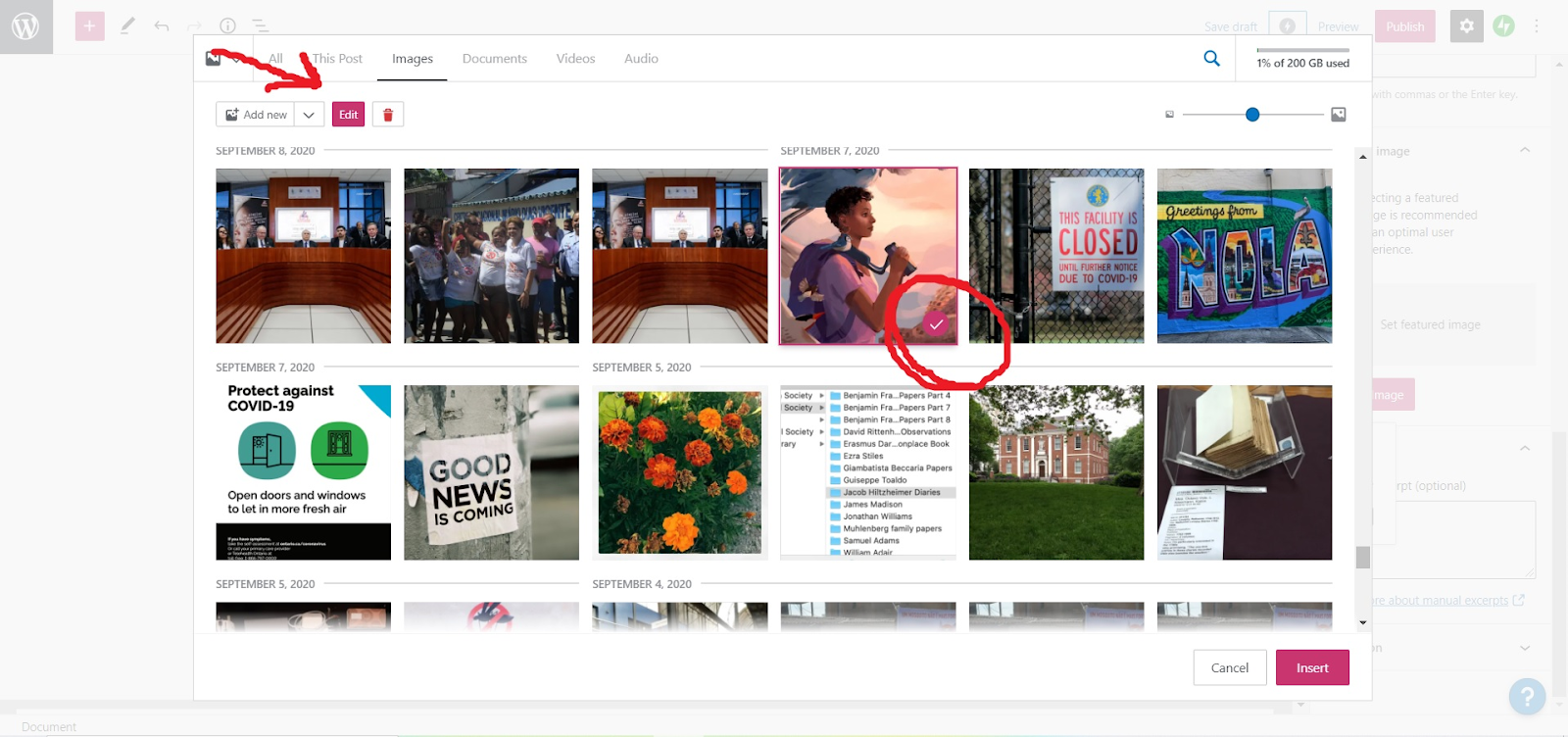
Add alt text and click on “insert.”

6. Add the Excerpt
Include a one-sentence excerpt for all submissions.

7. If a Submission is Part of a Series, Put the Title in Bold
Add <strong> in front of title, </strong> at end.

8. Add the Alt Text and the Image Description for Each Image
For each image, provide a source and an alt-text/image description. This is different from a caption. It’s a detailed explanation that describes the essential information in an image. In other words, you literally write out what you see. See e.g. here and here.

9. Add a Source and Image Description for the Featured Image Below the Endnotes

10. Add a Separator Between the Main Text and the Endnotes

11. If Necessary: Edit Footnotes in Code Editor
If you did not format the notes as footnotes in Word properly, and they do not copy over automatically, you may have to use the code editor. To do so, click on the 3 dots in the top right corner to switch to code editor.

Find the first parenthetical reference.

Create the first parenthetical reference.
Replace [1] with <a href=”#_ftn1″ name=”_ftnref1″>[1]</a>

And then just only change the number in each subsequent parenthetical reference.
Replace [2] with <a href=”#_ftn2″ name=”_ftnref2″>[2]</a>
Replace [3] with <a href=”#_ftn3″ name=”_ftnref3″>[3]</a>
Etc.

Find the first footnote towards bottom of the page.

Create the first footnote.
Replace [1] with <a href=”#_ftnref1″ name=”_ftn1″>[1]</a>

And then just only change the number in each subsequent footnote.
Replace [2] with <a href=”#_ftnref2″ name=”_ftn2″>[2]</a>
Replace [3] with <a href=”#_ftnref3″ name=”_ftn3″>[3]</a>
Etc.


